Run the services in separate processes
Start each service of a deployment in its own process, send each request to the right service, and know what continues while control restarts.
- For
- whoever runs a Reef deployment on more than one process or host
- Before you start
- a deployment that runs in one process (Operate a deployment)
- You will have
- the split layout, the routes of each service, and its failure behavior
A deployment has seven services. By default, reef serve runs all of them in one process. Run them in separate processes when inference must stay up while control restarts or deploys a new version, or when one service needs more replicas than the others.
No service calls another. Each one reads and writes the deployment's shared store and takes its work from a queue there. Control calls no engine: it queues serving work, and inference starts the artifact.
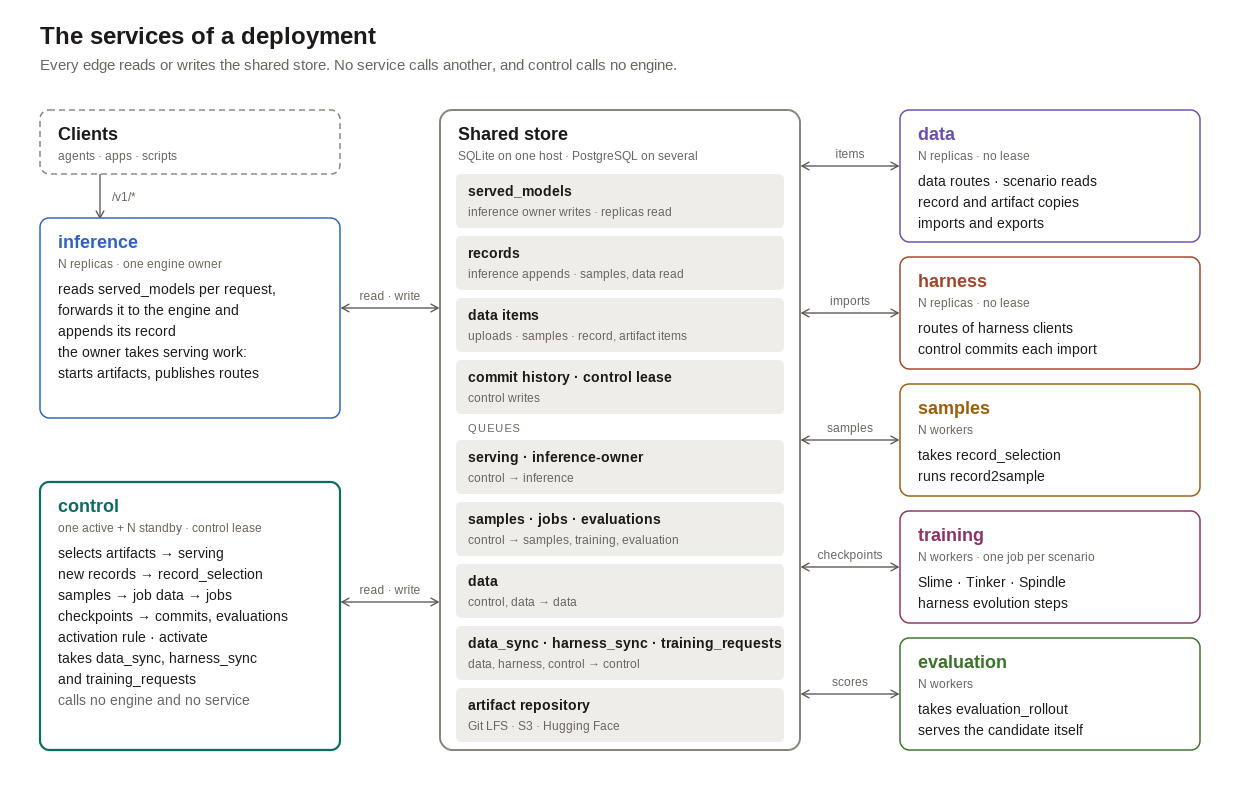
|
Service |
What it does |
What it writes |
|---|---|---|
|
control |
Serves the HTTP API except the data routes. Owns scenarios, commits and activation. Syncs each loaded scenario after a data write. |
Commits, serving requests, training checks and jobs, sample requests, evaluations, artifact copy requests |
|
inference |
Starts the selected artifacts and answers model requests from their published routes. |
served_models, serving results, records (as record items) |
|
samples |
Makes training samples from new records. |
Samples |
|
training |
Runs training jobs on the training component, and harness evolution steps on the harness training component. |
Job progress, trained artifacts, harness step records |
|
evaluation |
Runs the rollouts of artifact evaluations. It asks inference to serve each candidate and sends the rollout's model calls to that engine. |
Rollout results, the calls of each rollout |
|
data |
Serves the data routes and the reads of what each scenario stores. Copies new artifacts to artifact items. Runs data imports and exports. |
Data items, artifact items, data sync requests |
|
harness |
Serves the routes that a harness client calls: the active tree, the harness artifacts, the import of a person's files, and the adapters. |
Harness import requests |
Codebase structure maps each service to its code and its queues.
Start the services #
Start each service with the same config and --service:
export REEF_TOKEN="$(openssl rand -hex 16)"
reef serve -c deploy.yaml --service control --reef.port 8901
reef serve -c deploy.yaml --service inference --reef.port 8902
reef serve -c deploy.yaml --service samples --reef.port 8903
reef serve -c deploy.yaml --service training --reef.port 8904
reef serve -c deploy.yaml --service evaluation --reef.port 8905
reef serve -c deploy.yaml --service data --reef.port 8906
reef serve -c deploy.yaml --service harness --reef.port 8907
A --service process starts no other Reef service. Start the external engines and training backends that the config requires yourself.
Every process must reach the same stores:
-
The shared store. On one host, the default sqlite record backend works: the processes share the files under storage.agent-record-dir. On several hosts, use storage.record-backend: postgres. The services keep their shared tables in the schema <record schema>_coordination (reef_records_coordination by default), so deployments with their own record schemas share no tables.
-
The data store (storage.data-store), which follows the record backend by default (Choose the data store).
-
The artifact backend (storage.artifact-backend). The training service needs write access: it stores each saved checkpoint there.
Give each process its own storage.artifact-work-dir and storage.artifact-cache-dir, for example with --storage.artifact-work-dir on its command line. A process keeps its working copy of the artifact repository there, and two processes in one working copy break each other's fetches.
Send each request to its service #
|
Service |
Routes |
|---|---|
|
inference |
/v1/chat/completions, /v1/responses, /v1/messages, /v1/messages/count_tokens, the evaluation routes, the routes of each served artifact, and GET /reef/scenarios/{scenario}/inference/status. |
|
data |
The data routes (/reef/namespaces/{owner}/data...), GET /reef/scenarios/{scenario}/artifacts/{artifact_id}/files and GET /reef/scenarios/{scenario}/jobs. Control does not serve these in the split layout. Also the reads of what each scenario stores: the scenario list, settings, contract, records, commits, artifacts, samples, tasks, and evaluations with their rollouts. Control answers these reads too. |
|
harness |
GET /reef/harness, GET /reef/harness/artifacts, POST /reef/harness/import and GET /reef/harness/adapters. |
|
control |
Everything else: writes to a scenario, the next-job read, the cancel of a training job, /reef/status, the harness snapshot and request pages, and the step records. |
|
samples, training, evaluation |
/healthz only. They take their work from queues. |
The data and harness services need no control lease, so you can run several replicas of each behind one address. A one-process reef serve answers every route in the same way.
Inference #
Control queues each selected artifact for inference. The inference service opens the serving runtime, loads the artifact and publishes its route in served_models. Scenario creation and activation do not wait for this work. GET /reef/scenarios/{scenario}/inference/status reports pending, starting, ready or failed with the artifact ID (Startup status).
Send model requests to the inference service with the scenario in x-reef-scenario. For each request, the service:
-
Reads the scenario's rows in served_models. A model that names a served artifact selects its row. Any other model selects the active row, or the row that a traffic split gives the request.
-
Sends the request to the engine at the row's URL, under the row's model name. No artifact changes the request on its way. The only credential that it sends is the deployment's provider key (inference.upstream-api-key), when one is set.
-
Appends the record to the scenario's record store. x-reef-tag-* headers go into the record.
-
Returns the record ID in x-reef-agent-record-id and the answering artifact in x-reef-artifact-id.
The inference service never creates a scenario. Create it first with POST /reef/scenarios or a harness install. The service answers these errors:
|
Status |
When |
|---|---|
|
404 |
The scenario is unknown or serves no model. |
|
503 inference_starting, Retry-After: 30 |
The model is pending or starting, and no route can serve it. |
|
503 inference_start_failed |
The startup failed. It stays until a retry of the startup succeeds. |
|
the engine's own 4xx |
The engine refuses the request, for example a prompt longer than the model's context. An agent reads the message to end or compact its run. |
|
502 |
The engine fails otherwise or cannot be reached. |
|
504 |
The engine does not answer within inference.timeout-s. |
|
409 |
The engine aborts the request twice. The service reads the row again and retries once, for example during a change of the served model. |
|
503 with Retry-After |
The engine does not serve the selected weights on either attempt, or the retry finds no row for the request's artifact. |
|
503 |
The service cannot read served_models and has no earlier read from the last 300 seconds, or the record store does not take the record. |
The service never returns a buffered answer without its record. A stream goes out as the engine sends it, and its record is appended when it ends. A stream that fails after its headers gets no receipt. Request gives the stream cases and the retry rules.
Startup retries. A failed startup does not stay failed, because the selection still states what the scenario serves. Control queues the startup again 60 seconds after it failed, and doubles the wait after each automatic retry that fails, up to one hour. To retry at once, send the scenario's served mapping again (POST /reef/scenarios/{scenario}/update). This also sets the wait back to 60 seconds. The service that fails a work item writes one warning to its log, with the queue, the item ID, the scenario and the error.
Runtime ownership. One inference worker owns the serving runtime through a work lease, also while it is idle. Other inference replicas only serve requests. An interrupted startup returns to the queue after its work lease expires. When ownership changes:
-
The new owner opens its runtime and offers it the routes from before. A route stays when the runtime reports that its engine still serves it, as a remote endpoint can. Requests to it go on without a gap.
-
The other routes go, and their scenarios' requests get inference_starting. The completed selections return to starting, and the new owner activates them again.
-
Reef's own engines keep no route. The new owner starts a new engine stack, which ends the requests in flight, and loads each selection again.
The startup status is not a continuous engine health check. The runtime backend controls the cancellation of engine calls that were in progress when a worker lost its lease.
Request pinning. Reef's engines keep each request on the weights that it selected, and no setting turns this protection off. A change of weights waits for the requests in flight, for at most inference.timeout-s, and then interrupts them: none continues on the next weights. Request pinning lists the guarantees and their limits. Operate the inference component as follows:
-
Run control, the inference replicas and the component on the same Reef version. The component must confirm the protection at each engine start and at each health check, and the engine startup fails without it.
-
Keep the native engine addresses private. Clients use Reef's public inference API.
-
Restart the component after a reset of the coordination store, because owner sequences can otherwise move backwards.
-
An adapter that never loads keeps its engine stack unavailable, and the stack retries at each health check. Correct the artifact, or restart the serving worker, before you select a replacement.
-
A control call waits at most 30 seconds for an earlier one, and then gets a retryable HTTP 503. A native call that never returns needs operator recovery of the component; Reef never runs a second weight change beside it.
Training #
Only the training service builds a training component. Every other service reads what it needs about the backend from the config (Backend facts). Install the training dependencies only where the training service runs:
|
Backend |
What only the training service needs |
|---|---|
|
slime |
Slime, Megatron, Ray, PyTorch and Transformers |
|
tinker, spindle_full |
The backend's API key and its state-dir |
|
a harness recipe |
The adapter's binary, the sandbox, and evolution.state_dir |
|
a training backend plugin |
The plugin's own dependencies |
Control reaches the component through the shared store:
-
Job checks. The training service checks each job before it enters the queue. While the training service is down, a job waits and consumes no sample. /reef/status shows no running job for it until the check is answered.
-
Starts. A new trainer and a train-from name the snapshot that the next job starts from. The training service reads that snapshot from the artifact backend when it takes the job.
-
Checkpoints. The training service stores the files of each saved checkpoint in the artifact backend, and control commits them by name. Control reads no directory of the training service, so the two share no volume. A checkpoint that no commit took, such as one of a cancelled job, leaves the artifact backend when control deletes the job's ended item (storage.work-retention-s, 7 days by default).
-
Imports. An artifact import for tinker or spindle_full looks the checkpoint up on the backend's service, which the training service does. Such an import needs a running training service, and answers 503 when it gets no answer within 60 seconds.
Harness steps. A harness evolution step is a training job of the harness training component, so the training service runs the method, the coding agent and the evaluation runs. Only the training service reads and writes evolution.state_dir. It copies the running step's progress into the step's job in the shared store, and stores each ended step's record files in the artifact backend. Control reads both there for the snapshot and request pages.
The record files stay as long as the scenario. After you delete the scenario, control's sweep removes them from the artifact backend and asks the training service to move the scenario's directory under evolution.state_dir to archived/. The request waits while no training service runs.
Harness clients #
The harness service reads the commit history and the artifact backend, and loads a scenario without activating it. It writes no snapshot:
-
An import goes to control as a harness_sync request.
-
Control merges the files onto the newest active tree and commits the sync.
-
The harness service answers with control's answer.
The harness service waits up to 30 seconds for control. It then answers 503; the import stays queued, and the same files sent again wait for the same request.
Set harness.inference_url to the address at which clients reach the inference service. A client's layer then sends its model calls there, not to the harness service.
Data #
After each data write, the data service asks control to sync the scenarios that the write touched, and waits up to 30 seconds for the syncs. The response says whether they ended (synced). A sync that did not end runs when control takes it, or when the scenario next loads.
The samples, evaluation and data services load a scenario without changing its production engine.
Evaluation #
The inference service serves what served_models names: the active artifact of each scenario and the artifacts served beside it. A candidate under evaluation is not one of them. Before each trial, the evaluation service asks inference to start the candidate and waits until its engine is ready. It then sends the rollout's model calls to that engine. The request publishes no route, so no client reaches the candidate, and no call becomes a record of the scenario. An evaluation therefore needs a running inference service.
Control restarts #
While control is down:
-
The inference service continues to answer from served_models and to record. Control restarts do not reopen engines.
-
Training jobs, sample requests and evaluation rollouts that are already queued continue. New ones wait for control, because control adds them.
-
The data service continues to take data writes. Their syncs wait for control: each write waits 30 seconds and then answers "synced": false.
Standby instances. Control runs as one active instance and any number of standby instances on the same store:
-
The active instance holds the control lease and extends it.
-
A standby waits at start-up until it can take the lease. It loads no scenario and answers no request, /healthz included. A load balancer that checks /healthz therefore sends requests to the active instance alone.
-
When the active instance stops, it releases the lease, and a standby takes over within 10 seconds. When it crashes, a standby takes over after the lease expires (30 seconds).
-
An instance that loses the lease stops its training work and ends its process, so that its supervisor starts it again as a standby.
Each serving request carries the control lease number. Route publication checks the work lease, its attempt and the current request before it commits.
To deploy a new control version, start the new instance as a standby, then stop the old one.